

How to Change Operation Mode and Password of Hanwha SM482L (2)
From: Author: Publish time:2021-06-08 10:55 Clicks:114
1.1.2. Setting Manager Mode
The system manager password is needed to use the system setup menu. Access with
system manager and the password setup must be done in the following manner.
When accessing with system manager and setting up the password, perform access and
setup as follows.
When accessing with system manager, perform access as follows.
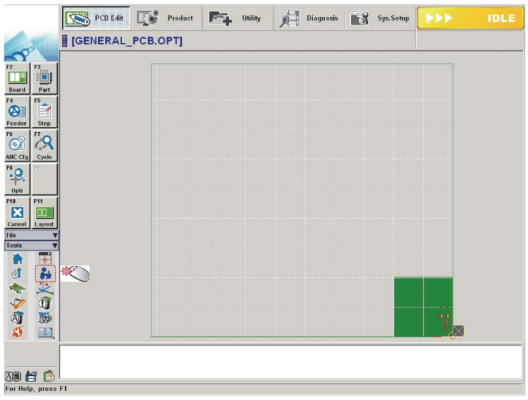
1. Click the ‘Operation Mode Change’ button in the submenu
2. Then the following dialog box appears.
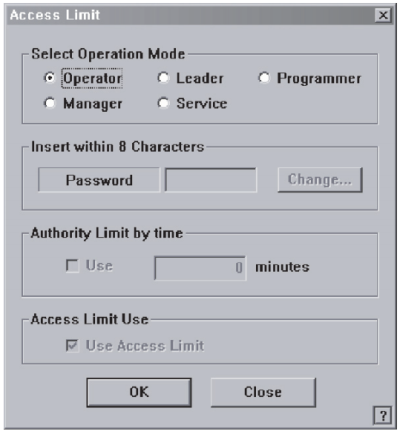
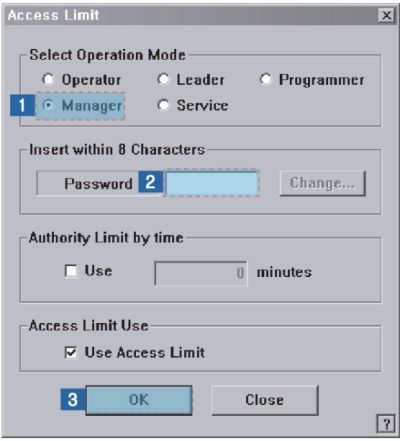
3. The setup with the manager mode is made in the following manner..
(1) Select the <Manager> option button in the <Select Operation Mode> group
(2) Enter the manager password in the <Password> editor box.
(3) Click the <OK> button.
1.2. Changing Password
Except for the plain users, each user mode has a password. The password is needed to set
each user mode. The password must be set within 8 characters.
Caution Do not share the programmer mode and manager mode
with the users other than the corresponding users. Damage
may be caused by the incorrect operation of the MMI by the
unauthorized user in the programmer mode or manager
mode.
- Select the ‘Operation Mode Change’ button in the menu-toolbar in the System
Manager Mode.
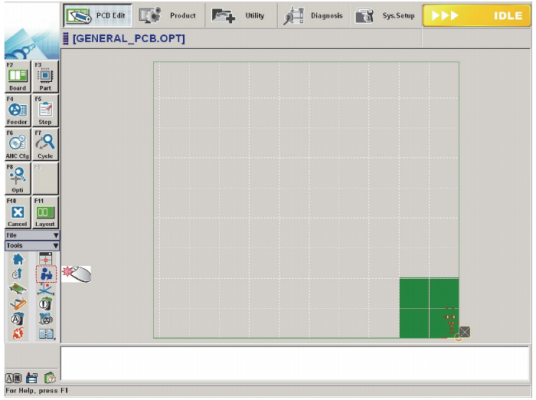
Once the ‘Operation Mode Change’ has been selected, the following dialog box
appears.
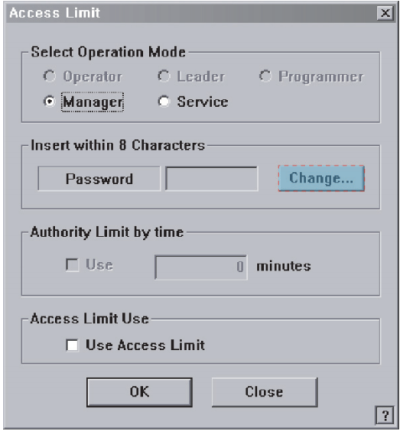
Click the <Change> button. And then the following dialog box appears.
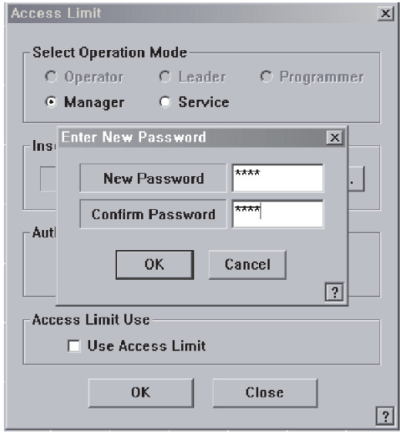
- Enter the password in the <New Password> edit box.
- Re-enter the password in the <Confirm Password> edit box in order to confirm the set password.
- Then click the <OK> button to apply the change.
1.3. Setting User Login Time
User authorization is automatically changed to ‘Operator’ after the set period of time.
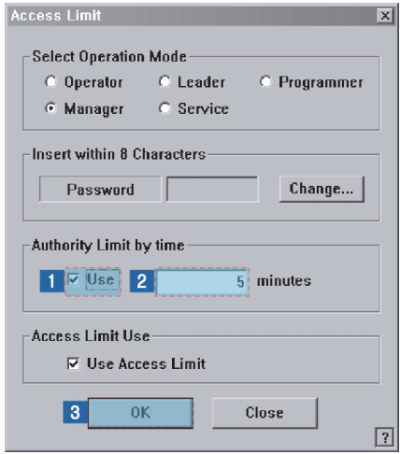
The setup is performed in the following manner.
- Select the <Use> check box in the <Authority Limit by time> group.
- Input the time to set in the edit box in minutes.
- Click the <OK> button.
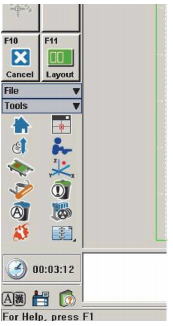
After the time is set up, the remaining time until the time for the authorization change is
indicated below the shortcut menu of the Tools at the right of the MMI.
Keywords:
SMT pick and place machine, JUKI RS-1R pick and place machine, JUKI RX-7R pick and place machine, JUKI Pick and place Machine, Samsung Pick and Place Machine, Hanwha SM481 Plus Pick and Place Machine, SMT482Plus, SMT 471Plus, SM321, SM421, SM451, SM485, SCM-1, SLM100, SLM120, EXCEN PRO M, DECAN F2, DECAN L2, DECAN S2, DECAN S1, HM520, Yamaha Pick and Place Machine, Panasonic Pick and Place Machine, FUJI Pick and Place Machine, Siemens Pick and Place Machine, Samsung SMT Mounter, Samsung Chip Mounter, Samsung Chip Shooter, Samsung Chip Placement.
ETA is a manufacturer of SMT machines. It mainly provides customers with SMT production lines including SMT Stencil Printers, Pick and place machines, Reflow Oven, AOI Machine, Wave Soldering Machine and PCB Handling Machine etc.
ETA has more than 25 researches on SMT and DIP technology, for the world Customers provide SMT total solutions. There are successful cases of SMT technical team in Asia, Europe, America, Africa, and Australia.
Welcome more people to discuss with us about SMT technologies and solutions, please contact us for more information: WhatsApp/ Skype / WeChat: +86-13670124230,Email: etasmt@foxmail.com